Hybrid Blended Learning: Designing Training That Works
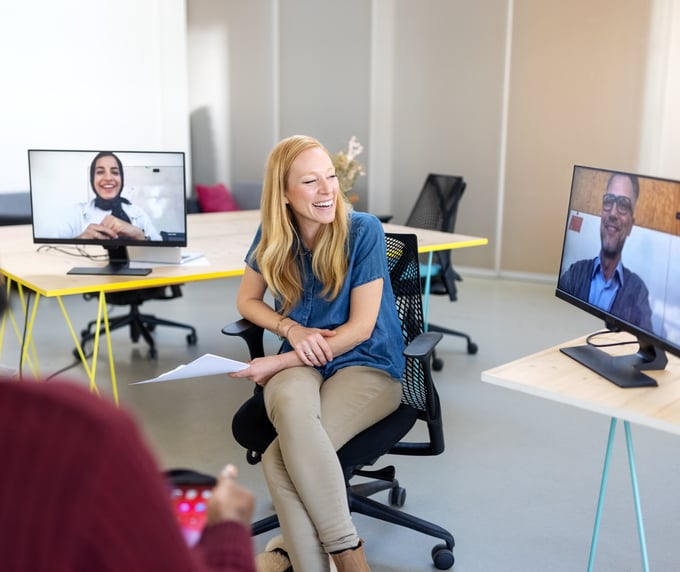
Hybrid blended learning is training designed for two audiences at once. Some participants are in a room together, others join remotely, but all participants are in the same synchronous session. Usually the hybrid program also includes self-paced and instructor-led elements. It is one of the most difficult formats in corporate training to run well, because every design element now has to work for two different participation structures. Designed without this challenge in mind, the remote group becomes an audience watching a meeting they cannot fully engage in. Designed deliberately, one cohort learns together regardless of geography, and the organization leverages the benefit of fewer travel expenses and travel-related productivity loss.
With more than 25 years designing and implementing learning for global audiences, we have configured programs for just about every distribution of participants, and hybrid participation configurations are where instructional design earns its keep. This article explains what hybrid blended learning actually is, how it differs from other forms of blended learning, why hybrid participant sessions may fail, and the three design principles that keep both in-person and virtual participant groups engaged. We start with a short video overview with our President and CEO, Kelly Fairbairn, who has designed and facilitated hybrid learning experiences since virtual live training entered the world of talent development.
As webinar-based facilitated training became more accessible, PPS International Limited worked with many groups that included hybrid participants. Since then, we have designed to this cohort model, sometimes because it was a necessary in-the-moment change due to participant weather-related travel delays, but also with lead time allowing for the program methodology to adapt to having audiences in person and joining via webinar. One example was working with a large distributor that sells metalworking products and factory maintenance supplies to industrial businesses. Most of the sales representatives of that organization worked remotely and traveled frequently to client manufacturing locations as they consulted on large-scale responses to RFPs. This audience expressed a preference to attend training remotely so as to not disrupt their client visit schedules.
We designed alternative activities in their program that would allow for these individuals to collaborate in virtual breakout rooms and then present their results to the larger cohort. To support the individuals, who were new to virtual collaboration, the client assigned an in-room producer who ensured that the in-room facilitator was able to attend to both audiences, creating a unified experience. Post-program measurements of skill usage and participant reactions were strong in both the in-person and the virtual participant groups.
What is hybrid blended learning?
Two terms get merged when describing hybrid learning, and isolating them clarifies the design needed. Hybrid describes where people are participating: for instance, a single live facilitated session with in-person and remote participants in the same synchronous event. Blended describes how modalities mix across a program, such as live sessions, self-paced modules, application work, and coaching combined into one learning journey. Hybrid blended learning is the combination, meaning a blended program whose live sessions are themselves hybrid.
Hybrid vs. blended learning: what's the difference?
| Dimension | Hybrid learning | Blended learning |
|---|---|---|
| What it describes | Where participants are during a live session | How learning modalities combine across a program |
| The core question | Can both rooms participate equally right now? | Is each element in the modality that serves it best? |
| Typical unit | One session with two audiences | A program: live sessions, e-learning, application, coaching |
| Main design risk | Remote participants become spectators | Elements stack up without connecting |
| Staffing implication | Producer support during delivery | Curriculum architecture up front |
A program can be blended without any hybrid sessions, and a single hybrid workshop can exist outside any blend of learning. The design disciplines are different, which is why a team that runs excellent virtual training can still deliver an ineffective hybrid workshop.
Why hybrid sessions fail
Hybrid failure has a consistent anatomy, including:
- Room gravity. The facilitator's attention drifts to the faces physically present. Remote participants notice early on and quietly disengage.
- Audio asymmetry. The room hears everything; remote participants hear whoever is near a microphone. Side comments and laughter become a conversation half the cohort can hear happening but have no context in order to join.
- Two-speed activities. An exercise built for tables can leave remote participants improvising in a breakout room, or worse, waiting. Engagement drops for the remote participants.
- Static, minimal visuals. A slide that sits on screen for ten minutes works in a room where the facilitator is the focal point. For a remote participant, it is a still image with a voice, which lacks interest.
These are design problems, which is good news, because design is controllable.
Design principle 1: engage both audiences on purpose
Design the visual experience for the screen first, because the room gets the facilitator's physical presence by default. In practice: more diagrams and fewer words, more slides rather than fewer, so nothing sits on screen long enough to go stale. Movement in the materials substitutes for the movement remote participants cannot see. Then engineer attention parity into the facilitation itself. Address questions to remote participants by name, use a camera in-room if possible, put the remote gallery on a screen the facilitator naturally faces so eye contact reaches the camera, and alternate deliberately between virtual and in-person when taking contributions.
Design principle 2: parallel paths for every activity
Every activity needs a designed path for both audiences before the session starts. Without parallel paths, one group interacts while the other watches, and engagement drops on the watching side. The reliable pattern for small-group work is all-on-device: everyone joins breakouts from their own laptop, including people sitting in the same room. It feels counterintuitive to send roommates to screens, but a mixed group of three in-room participants huddled around one laptop with a remote colleague inside it produces a spectator, every time. The same logic extends to materials, which should be digital-first with the printed version as the copy, and to discussion channels, where one shared chat carries questions and reactions for everyone so the room cannot develop a private backchannel. Structured connection across the two groups deserves its own design pass, which we cover in networking activities for training sessions.
Design principle 3: staff the seam with producers
A hybrid session of any complexity needs production support on both sides: a virtual producer managing breakouts, chat, and remote troubleshooting, and an in-person producer handling the room's microphones, cameras, and logistics. The facilitator facilitates; the moment they start admitting people from a waiting room while re-launching breakouts, both audiences lose them. Producers change what the agenda looks like. A hybrid run sheet specifies, minute by minute, what each producer does at every transition, including who opens the rooms, who posts the prompt, who watches for the stranded participant. It is more detailed than a standard agenda by design, and the detail is what makes the session look effortless. This is the same discipline we apply to preparing and evaluating our own facilitators. Quality in delivery is mostly preparation made invisible.
Along the same lines, hybrid delivery benefits greatly from strong production support. We work with professional producers who have comfort with technology, can maintain their own attention for long periods of time so as to catch cues from both participants and facilitators, and who are not flustered by challenges such as participants with low skill in using technology or dropped audio, for instance.
The technology baseline
Equipment does not make a hybrid session, but missing technology derails even the best designed hybrid session. The baseline functions we recommend:
- Microphone coverage for the whole room. Remote participants must hear every in-room voice, including the aside from the back table. Ceiling or throwable mics, or a firm pass-the-mic norm, are all workable; an open laptop at the front of the room is not.
- A camera view that follows the facilitator and other voices. At minimum, one wide shot of the room and a framed view of the facilitator is ideal. If remote participants cannot see who is speaking, it is difficult to maintain interest and rapport with the remote group.
- A dedicated gallery screen. Seek to have remote faces displayed where those in the room and the facilitator naturally look, at a size where expressions can be read. Participants tend to talk to people they can see.
- A fallback plan. Create a plan that answers "what happens if the platform drops," including who will set up the new log-in meeting. Thirty seconds of planning that prevents twenty minutes of chaos.
Placing hybrid sessions inside the blend
The blended wrapper is what makes hybrid sessions affordable, because it lets you protect live time for the things only live time can do. A helpful sorting rule is to use self-paced methods for any content that transfers knowledge, and the facilitated, live and hybrid session for collaborative discussion, practice, feedback, and decision making. In practice that means pre-work includes concepts and preparation work, often as short segments in the style of our digital microlearning deployment, the facilitated live session focuses on application, and between-session work embeds skills and knowledge application into real-life work.
A hybrid session design checklist
Before the session:
- Rehearse the full technical path, including breakouts, polls, screen shares, and the handoffs between facilitator and producers.
- Send remote participants digital copies of the materials those in the room will have, in advance. If those in the room will have materials in hard copy, suggest that participants working remotely also print theirs out.
- Assign every remote participant an in-room buddy for "hallway" context and advocacy. Allow time in the session for buddies to check in before breaks.
- Write the producer run sheet with assigned owners for every transition.
During the session:
- Open with a remote voice first; it sets the norm that those on screen are full participants.
- Run all small-group work on individual devices, mixed across modality.
- Keep one shared chat channel as the single stream for questions and reactions. Invite those in the room to also post in that chat, or have an in-room producer capture.
- Reset visual attention every few minutes; no slide should outlive its interest.
- If available, turn on closed captioning so that the dialogue has a visual component.
- Ensure facilitators use active listening, summarizing key points, meaning and questions before responding.
After the session:
- Debrief with both facilitators and producers while any friction points are top of mind.
- Compare engagement between the two audiences using whatever data you have, such as participation and chat activity split by modality.
- Transfer any fixes into the next run sheet and facilitation guide, because hybrid quality improves session over session.
When to run hybrid, and when not to
Hybrid is worth its implementation complexity when the cohort is genuinely distributed and learning is improved through real-time collaboration. A few examples are leadership programs where the cohort networking and interaction is the primary goal, kickoffs that set common direction for a longer learning journey, and team building and working sessions where decisions get made but benefit from input from all. Hybrid learning may not be the right solution when nothing in the learning outcomes requires the two audiences to interact. The true cost of hybrid participant groups includes a producer, more extensive design time, preparation and rehearsal.
With lead time for design, hybrid participant groups can be successfully facilitated. Our experience is that often, the cost and effort are better used to have two separate sessions, one fully virtual and one in-person, with a fully virtual or hybrid review session after both are run. We used this approach with a global pharmaceutical organization that had about one third of their population in remote locations. The effort to design hybrid learning was far greater than the effort to convert an in-person session to virtual. Because the program topics were around building influence skills, and the mixing of participants wasn't necessary to achieve learning outcomes, the effort of a hybrid build and facilitation was significantly higher than two separate sessions. The client opted to bring the two groups together for a 45-minute, all-virtual check-in on application of skills and best practice sharing. This component supported both networking amongst participants and transfer of learning to the workplace.
Frequently asked questions
What is an example of hybrid learning in corporate training?
A leadership development cohort of thirty, with eighteen participants in a training room and twelve joining live by webinar platform with video from other sites. Everyone experiences the same session at the same time with shared visuals, mixed breakout groups on individual devices, one chat stream, and a facilitator supported by an in-room producer.
What are the disadvantages of hybrid training?
Higher design and staffing cost, more technical failure points, and a structural risk that remote participants become less engaged attendees. All three are manageable; the first two are the price of the format. The third is a design outcome. Sessions built with parallel paths, attention parity, and producer support largely avoid lack of participant engagement.
How many participants can a hybrid session handle?
The practical ceiling is set by interaction design, not the platform. With parallel paths and producer support, cohorts of up to 40 mixed participants run well. The more evenly divided the in-person and hybrid participants, the more effective the hybrid solution: a group with 38 people in the physical room and two people joining remotely feels like an afterthought, and requires that those in the room join breakout rooms with remote participants to build rapport and collaboration. We have seen that more than 40 participants becomes a broadcast unless you design much more time for collaboration and consolidation of results. For larger audiences, we recommend splitting the group into multiple cohort sessions or accepting a deliberately presentational format with a few structured activities or practices. For this approach, make sure participants know this is the format so they can manage their expectations of the learning.
Do you really need a producer for a hybrid session?
For anything beyond a presentation with questions, yes, and complex sessions warrant one per audience. The producer role is what lets the facilitator manage the learning versus the mechanics. If the budget genuinely cannot carry a producer, simplify the session design until one person can run it, which usually means fewer transitions and no simultaneous multi-group activity.
Where to start
Take your next scheduled hybrid session and redesign at least three things: give every activity a parallel path to accommodate remote participants, move small-group work to individual devices, and involve a producer who is in person but focused on the virtual participants. Those three changes eliminate most of the spectator problem on their own. If you are building a full hybrid blended program and want design or delivery help, this is work we do for global and local clients, and we would be glad to give input to your project.